> ## Documentation Index
> Fetch the complete documentation index at: https://docs.helloclever.co/llms.txt
> Use this file to discover all available pages before exploring further.
# September 2026
> PayID payouts on v2, UGX bank transfer, payout approvals, USD Treasury Accounts, JPY and USD settlement management, and the Reporting API.
September adds two payout capabilities to the v2 API, a maker-checker approval step for payouts, USD Treasury Accounts, settlement configuration for JPY and USD, and a read-only Reporting API for settlement reconciliation.
| Category | Changes |
| - | - |
| [Breaking changes](#breaking-changes) | v1 AUD batch payouts reject mixed methods; payout approvals change `Create Payout` semantics when enabled |
| [Merchant Portal](#merchant-portal) | USD Treasury Accounts, Settlement Management for JPY and USD, payout approvals, settlement funding checks |
| [API](#api) | `au_payid_npp_aud` payout method on v2, `ug_bank_ugx` Payins and payouts |
| [Reporting](#reporting) | `GET /v2/reports/settlements` |
| [Payment Gateway](#payment-gateway) | UGX bank transfer on Payment Gateway 3 |
## Breaking changes
### v1 AUD batch payouts must use one method per request
[Create a Payout](/api/aud-payout/create-a-payout) (`POST /v1/payouts`) and [Create Payout Batch via File](/api/aud-payout/create-payout-batch-via-file) now require every transaction in a request to use the same addressing method.
* Send `payid` (with `payid_type`) on **every** transaction, or `bsb` and `account_number` on **every** transaction.
* A request or file that mixes the two is rejected.
* A single transaction still cannot carry both `payid` and `bsb`/`account_number`.
**Action required:** if your integration builds mixed batches, group transactions by method and send one request per group.
### Opt-in: payout approvals change what a successful `Create Payout` means
When [payout approvals](#payout-approvals) are enabled for your merchant account, the request and response of [Create a Payout](/api/payout/create-a-payout) are unchanged, but the payout is **held** rather than processed. Nothing is sent to the recipient until an Admin or Finance user approves it in the Merchant Portal.
* A `2xx` response no longer implies funds are moving. Drive your state machine from the payout webhook, not the create response.
* A payout can end in **Rejected** without ever being processed. Treat this as a terminal business outcome, not a request error.
* The feature is off by default and enabled per merchant account by Hello Clever Support. It applies to payouts created through the API and the Merchant Portal alike.
Docs: [Reviewing and approving payouts](/portal/payout-approvals#payouts-created-through-the-api)
## Merchant Portal
### USD Treasury Accounts
You can open a **USD Treasury Account** from the Treasury **All Balances** screen, alongside AUD. Unlike AUD, a USD account goes through review before Hello Clever issues bank details.
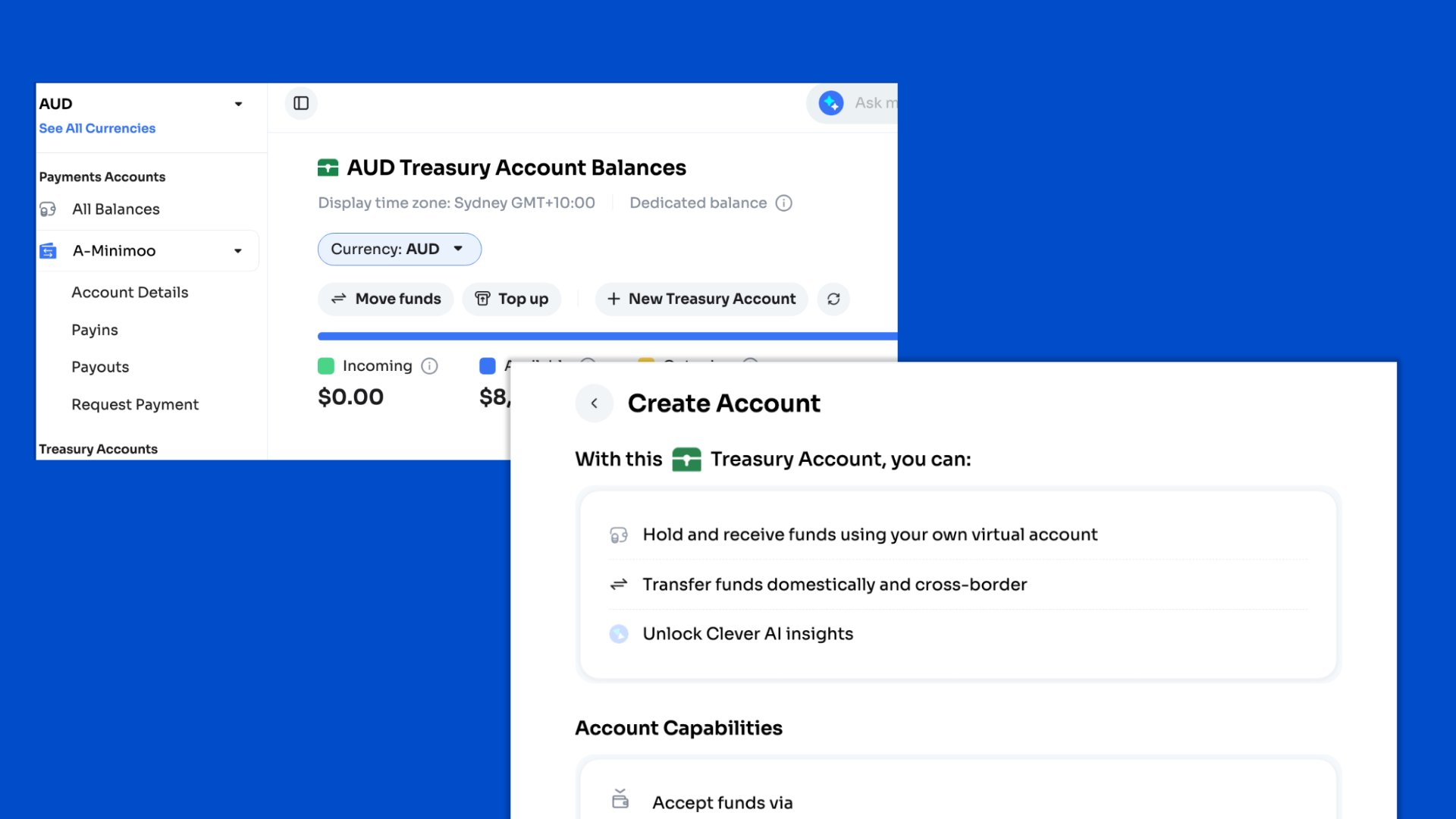 | Status | Meaning | Next step |
| - | - | - |
| **Submitted** | Awaiting Hello Clever review. No bank details, balance, or money movement yet. | None. Review takes a few hours to a few days. |
| **Changes requested** | Details need correcting or adding. | Edit and resubmit. |
| **Rejected** | Submission not approved. Reasons are shown on the account. | Address the reasons and resubmit. |
| **Active** | Approved. USD bank details are issued within seconds. | Top up, receive settlements, move funds. |
| **Failed** | Approved, but the account could not be opened. | Check the details shown and resubmit. |
Each resubmission creates a new submission record. Earlier submissions are retained.
Transfers out of an active USD Treasury Account:
* **Internal:** to your other Hello Clever accounts, for example a USD Payments Account.
* **External:** to bank accounts in the United States only. Non-US destinations are not yet supported.
A new transfer is created in **Processing** and returns a Balance ID (for example `po_1tjreKKucrcM`). In sandbox, drive it to a final state with `POST /v2/transfers/simulate`, passing that ID as `uuid` and `status` as `completed` or `failed`.
Docs: [Treasury Accounts](/platform-overview/clever-concepts/treasury-accounts#opening-a-usd-treasury-account) · [Transfer flow](/platform-overview/clever-concepts/transfer-flow#simulating-a-transfer-outcome-api)
### Settlement Management for JPY and USD
[Settlement Management](/portal/balances#settlement-management) now supports **JPY** and **USD** Payments Accounts, in addition to AUD. Each currency is configured independently.
* **Frequency:** **End of day** settles automatically once a day in your account's time zone. **On-demand** settles only when you request it. A manual request is available on either schedule.
* **Beneficiary Settlement Account:** an external bank account or, where supported, one of your Treasury Accounts in the same currency. There is no cross-currency settlement.
* Beneficiary changes apply to future settlements only. In-flight settlements keep their original destination.
The beneficiary form now renders the fields required for the selected currency:
| Currency | Required bank details |
| - | - |
| **AUD** | BSB and account number, or PayID |
| **JPY** | Bank name and code, branch name and code, account type, account number, account name |
| **USD** | Account holder name, email, and address; bank name; SWIFT code; routing number; account details |
Docs: [Settlement](/portal/balances#settlement) · [Settlement Service](/services/settlement)
### Settlement funding checks for JPY, VND, IDR, and INR
Settlements in **JPY**, **VND**, **IDR**, and **INR** now pass an internal funding check before they execute, because these currencies are funded through more than one banking partner.
* The settlement stays in **Processing** for the duration of the check. No new status is introduced and no action is required.
* The amount moves from available to outgoing balance at submission, as for any settlement.
* The settlement remains a single record in your balance history, however it is funded.
* AUD settlements are never held for this check.
A settlement into a Treasury Account writes two records: **Settlement** against the Payments Account and **Transfer In** against the Treasury Account. This is expected, not double counting.
Docs: [Movements that wait for a funding check](/platform-overview/clever-concepts/moving-money#movements-that-wait-for-a-funding-check)
### Payout approvals
Payout approvals add a maker-checker step between creating a payout and processing it.
| Status | Meaning |
| - | - |
| **In Review** | Awaiting a decision. Not submitted for processing. Amount moved from available to outgoing balance. |
| **Pending** | Approved and queued for normal processing, including retries and failure handling. |
| **Rejected** | Declined by an approver. Terminal. Amount returned to available balance. |
* **Who can decide:** Admin and Finance users only. The creator of a portal payout cannot approve it. API-created payouts can be decided by any Admin or Finance user.
* **Concurrency:** the first decision wins. A concurrent second decision is refused and does not change the outcome.
* **Notification:** the account Admin is emailed, with all Finance users copied. The email contains Payout ID, Balance ID, External ID, method, and a **Review Payout** link that requires portal authentication.
* **Audit:** creator, outcome, decider, timestamp, and optional rejection reason are stored with the payout.
Docs: [Reviewing and approving payouts](/portal/payout-approvals)
## API
### PayID payouts on v2 (`au_payid_npp_aud`)
The v2 Payout API can now pay out AUD to an email or phone PayID over the New Payments Platform (NPP). [Get Payout Methods](/api/payout-methods/get-payout-methods) for `AUD` now returns `au_bank_aud` and `au_payid_npp_aud`.
| `payout_method_params` field | Required | Notes |
| - | - | - |
| `pay_id` | Yes | The beneficiary's PayID |
| `pay_id_type` | Yes | `EMAIL` or `PHONE` |
| `description` | No | Description for the payout |
Minimum amount is 1 AUD.
```json POST /v2/payouts theme={null}
{
"currency": "AUD",
"payout_method_name": "au_payid_npp_aud",
"description": "Test payout",
"external_id": "124",
"payout_transaction_details": [
{
"first_name": "Clever",
"last_name": "Hello",
"email": "test@example.com",
"amount": 100,
"payout_method_params": {
"pay_id": "test@example.com",
"pay_id_type": "EMAIL",
"description": "Test payout"
}
}
],
"webhook_notification": {
"endpoint_url": "https://yourserver.co/notifications",
"authorization_header": "****"
}
}
```
The v2 field names are `pay_id` and `pay_id_type` with uppercase enum values. The v1 AUD Payout API uses `payid` and `payid_type` with lowercase values. Do not mix them.
Docs: [Create a Payout](/api/payout/create-a-payout) · [Get Payout Required Fields](/api/payout-methods/get-payout-required-fields)
### UGX bank transfer (`ug_bank_ugx`)
Accept Payins and send payouts in Ugandan shillings through the v2 API using `ug_bank_ugx`. Amount limits for both directions are 15,000 to 36,000,000 UGX.
`payin_method_params` validation depends on `user_type`:
| `user_type` | Required fields |
| - | - |
| `individual` | `first_name`, `last_name`, `address`, `dob` (`MM/DD/YYYY`), `document_number`, `document_type`, `phone`, `country`, `user_id` |
| `organization` | `business_name`, `business_reg_no`, `user_id` |
Payouts take the same `user_type` rules (without `first_name` and `last_name`) plus these mandatory fields:
* `account_number` and `account_name`
* `bank_code`: from the `banks` list returned by [Get Payout Required Fields](/api/payout-methods/get-payout-required-fields), for example `DFCUUGKA`
* `payment_reason`: one of `other`, `bills`, `groceries`, `travel`, `health`, `entertainment`, `housing`, `school-fees`
Docs: [Handle multi-currency Payins and payouts](/developer-reference/api-use-cases/handle-multi-currency-payins-and-payouts) · [Create a Payin](/api/payin/create-a-payin) · [Create a Payout](/api/payout/create-a-payout)
## Reporting
### Reporting API: `GET /v2/reports/settlements`
The new Reporting API exposes the settlement reports previously delivered by email. The files and figures are unchanged. You pull them on your own schedule.
It authenticates with the same `app-id` and `secret-key` headers as the payment APIs, and returns reports for the currency tied to that `app-id`.
| Query parameter | Required | Notes |
| - | - | - |
| `from_date`, `to_date` | Yes | `YYYY-MM-DDThh:mm:ssZ`. Matched against report **generation** time. Range must not exceed 90 days. |
| `report_frequency` | No | `daily`, `weekly`, `monthly`, or a comma-separated list. Omit for all enabled frequencies. |
| `cursor` / `previous_cursor` | No | Page forward or backward. Mutually exclusive. |
| `size` | No | Default 20, maximum 100. |
Each entry returns file metadata, a `summary` object (`settlement_count`, `settled_amount`, `settled_fee`, `closing_balance`, `closing_balance_at`), and `file_url`.
```bash theme={null}
curl "https://api.lightningpay.me/api/v2/reports/settlements?from_date=2026-09-01T00:00:00Z&to_date=2026-09-30T00:00:00Z&report_frequency=daily" \
-H "app-id: your-app-id" \
-H "secret-key: your-secret-key"
```
Integration notes:
* **`file_url` is pre-signed and valid for 3 minutes.** Fetch it with a plain `GET` and no auth headers, in the same run. Store the report `id`, never the link. A link is minted per returned entry, so set `size` to what you will fetch.
* **Reports are generated at 09:00 in your account's time zone.** A daily report covers 09:00 to 09:00, not calendar days.
* **Frequencies overlap.** A settlement appears in both its daily and monthly report. Filter on `report_frequency` to avoid double posting.
* **Files are immutable.** Use `Reference` to match bank statement deposits and `Balance ID` to trace a row through [Get Balance History V2](/api/balance/get-balance-history-v2).
Docs: [Reporting API overview](/api/reporting/overview) · [Settlement reporting](/api/reporting/settlement) · [Get Settlement Reports](/api/reporting/get-settlement-reports)
## Payment Gateway
### UGX bank transfer on Payment Gateway 3
Payment Gateway 3 now offers UGX bank transfer (`ug_bank_ugx`) to customers paying in Ugandan shillings, alongside NZD, HKD, MWK, TZS, and KHQR USD. Contact [support@helloclever.co](mailto:support@helloclever.co) to enable it for your account.
Docs: [Payment Gateway 3](/api/v3/introduction) · [Multi-Currency hosted checkout](/platform-overview/customer-guides/multi-currency-checkout)
## Related topics
- [Release Notes](/release-notes/index.md)
- [Hello Clever MCP](/clever-ai/helloclever-mcp.md)
- [August 2026](/release-notes/2026-08.md)
This documentation is built and hosted on [Mintlify](https://mintlify.com), a developer documentation platform.
| Status | Meaning | Next step |
| - | - | - |
| **Submitted** | Awaiting Hello Clever review. No bank details, balance, or money movement yet. | None. Review takes a few hours to a few days. |
| **Changes requested** | Details need correcting or adding. | Edit and resubmit. |
| **Rejected** | Submission not approved. Reasons are shown on the account. | Address the reasons and resubmit. |
| **Active** | Approved. USD bank details are issued within seconds. | Top up, receive settlements, move funds. |
| **Failed** | Approved, but the account could not be opened. | Check the details shown and resubmit. |
Each resubmission creates a new submission record. Earlier submissions are retained.
Transfers out of an active USD Treasury Account:
* **Internal:** to your other Hello Clever accounts, for example a USD Payments Account.
* **External:** to bank accounts in the United States only. Non-US destinations are not yet supported.
A new transfer is created in **Processing** and returns a Balance ID (for example `po_1tjreKKucrcM`). In sandbox, drive it to a final state with `POST /v2/transfers/simulate`, passing that ID as `uuid` and `status` as `completed` or `failed`.
Docs: [Treasury Accounts](/platform-overview/clever-concepts/treasury-accounts#opening-a-usd-treasury-account) · [Transfer flow](/platform-overview/clever-concepts/transfer-flow#simulating-a-transfer-outcome-api)
### Settlement Management for JPY and USD
[Settlement Management](/portal/balances#settlement-management) now supports **JPY** and **USD** Payments Accounts, in addition to AUD. Each currency is configured independently.
* **Frequency:** **End of day** settles automatically once a day in your account's time zone. **On-demand** settles only when you request it. A manual request is available on either schedule.
* **Beneficiary Settlement Account:** an external bank account or, where supported, one of your Treasury Accounts in the same currency. There is no cross-currency settlement.
* Beneficiary changes apply to future settlements only. In-flight settlements keep their original destination.
The beneficiary form now renders the fields required for the selected currency:
| Currency | Required bank details |
| - | - |
| **AUD** | BSB and account number, or PayID |
| **JPY** | Bank name and code, branch name and code, account type, account number, account name |
| **USD** | Account holder name, email, and address; bank name; SWIFT code; routing number; account details |
Docs: [Settlement](/portal/balances#settlement) · [Settlement Service](/services/settlement)
### Settlement funding checks for JPY, VND, IDR, and INR
Settlements in **JPY**, **VND**, **IDR**, and **INR** now pass an internal funding check before they execute, because these currencies are funded through more than one banking partner.
* The settlement stays in **Processing** for the duration of the check. No new status is introduced and no action is required.
* The amount moves from available to outgoing balance at submission, as for any settlement.
* The settlement remains a single record in your balance history, however it is funded.
* AUD settlements are never held for this check.
A settlement into a Treasury Account writes two records: **Settlement** against the Payments Account and **Transfer In** against the Treasury Account. This is expected, not double counting.
Docs: [Movements that wait for a funding check](/platform-overview/clever-concepts/moving-money#movements-that-wait-for-a-funding-check)
### Payout approvals
Payout approvals add a maker-checker step between creating a payout and processing it.
| Status | Meaning |
| - | - |
| **In Review** | Awaiting a decision. Not submitted for processing. Amount moved from available to outgoing balance. |
| **Pending** | Approved and queued for normal processing, including retries and failure handling. |
| **Rejected** | Declined by an approver. Terminal. Amount returned to available balance. |
* **Who can decide:** Admin and Finance users only. The creator of a portal payout cannot approve it. API-created payouts can be decided by any Admin or Finance user.
* **Concurrency:** the first decision wins. A concurrent second decision is refused and does not change the outcome.
* **Notification:** the account Admin is emailed, with all Finance users copied. The email contains Payout ID, Balance ID, External ID, method, and a **Review Payout** link that requires portal authentication.
* **Audit:** creator, outcome, decider, timestamp, and optional rejection reason are stored with the payout.
Docs: [Reviewing and approving payouts](/portal/payout-approvals)
## API
### PayID payouts on v2 (`au_payid_npp_aud`)
The v2 Payout API can now pay out AUD to an email or phone PayID over the New Payments Platform (NPP). [Get Payout Methods](/api/payout-methods/get-payout-methods) for `AUD` now returns `au_bank_aud` and `au_payid_npp_aud`.
| `payout_method_params` field | Required | Notes |
| - | - | - |
| `pay_id` | Yes | The beneficiary's PayID |
| `pay_id_type` | Yes | `EMAIL` or `PHONE` |
| `description` | No | Description for the payout |
Minimum amount is 1 AUD.
```json POST /v2/payouts theme={null}
{
"currency": "AUD",
"payout_method_name": "au_payid_npp_aud",
"description": "Test payout",
"external_id": "124",
"payout_transaction_details": [
{
"first_name": "Clever",
"last_name": "Hello",
"email": "test@example.com",
"amount": 100,
"payout_method_params": {
"pay_id": "test@example.com",
"pay_id_type": "EMAIL",
"description": "Test payout"
}
}
],
"webhook_notification": {
"endpoint_url": "https://yourserver.co/notifications",
"authorization_header": "****"
}
}
```
The v2 field names are `pay_id` and `pay_id_type` with uppercase enum values. The v1 AUD Payout API uses `payid` and `payid_type` with lowercase values. Do not mix them.
Docs: [Create a Payout](/api/payout/create-a-payout) · [Get Payout Required Fields](/api/payout-methods/get-payout-required-fields)
### UGX bank transfer (`ug_bank_ugx`)
Accept Payins and send payouts in Ugandan shillings through the v2 API using `ug_bank_ugx`. Amount limits for both directions are 15,000 to 36,000,000 UGX.
`payin_method_params` validation depends on `user_type`:
| `user_type` | Required fields |
| - | - |
| `individual` | `first_name`, `last_name`, `address`, `dob` (`MM/DD/YYYY`), `document_number`, `document_type`, `phone`, `country`, `user_id` |
| `organization` | `business_name`, `business_reg_no`, `user_id` |
Payouts take the same `user_type` rules (without `first_name` and `last_name`) plus these mandatory fields:
* `account_number` and `account_name`
* `bank_code`: from the `banks` list returned by [Get Payout Required Fields](/api/payout-methods/get-payout-required-fields), for example `DFCUUGKA`
* `payment_reason`: one of `other`, `bills`, `groceries`, `travel`, `health`, `entertainment`, `housing`, `school-fees`
Docs: [Handle multi-currency Payins and payouts](/developer-reference/api-use-cases/handle-multi-currency-payins-and-payouts) · [Create a Payin](/api/payin/create-a-payin) · [Create a Payout](/api/payout/create-a-payout)
## Reporting
### Reporting API: `GET /v2/reports/settlements`
The new Reporting API exposes the settlement reports previously delivered by email. The files and figures are unchanged. You pull them on your own schedule.
It authenticates with the same `app-id` and `secret-key` headers as the payment APIs, and returns reports for the currency tied to that `app-id`.
| Query parameter | Required | Notes |
| - | - | - |
| `from_date`, `to_date` | Yes | `YYYY-MM-DDThh:mm:ssZ`. Matched against report **generation** time. Range must not exceed 90 days. |
| `report_frequency` | No | `daily`, `weekly`, `monthly`, or a comma-separated list. Omit for all enabled frequencies. |
| `cursor` / `previous_cursor` | No | Page forward or backward. Mutually exclusive. |
| `size` | No | Default 20, maximum 100. |
Each entry returns file metadata, a `summary` object (`settlement_count`, `settled_amount`, `settled_fee`, `closing_balance`, `closing_balance_at`), and `file_url`.
```bash theme={null}
curl "https://api.lightningpay.me/api/v2/reports/settlements?from_date=2026-09-01T00:00:00Z&to_date=2026-09-30T00:00:00Z&report_frequency=daily" \
-H "app-id: your-app-id" \
-H "secret-key: your-secret-key"
```
Integration notes:
* **`file_url` is pre-signed and valid for 3 minutes.** Fetch it with a plain `GET` and no auth headers, in the same run. Store the report `id`, never the link. A link is minted per returned entry, so set `size` to what you will fetch.
* **Reports are generated at 09:00 in your account's time zone.** A daily report covers 09:00 to 09:00, not calendar days.
* **Frequencies overlap.** A settlement appears in both its daily and monthly report. Filter on `report_frequency` to avoid double posting.
* **Files are immutable.** Use `Reference` to match bank statement deposits and `Balance ID` to trace a row through [Get Balance History V2](/api/balance/get-balance-history-v2).
Docs: [Reporting API overview](/api/reporting/overview) · [Settlement reporting](/api/reporting/settlement) · [Get Settlement Reports](/api/reporting/get-settlement-reports)
## Payment Gateway
### UGX bank transfer on Payment Gateway 3
Payment Gateway 3 now offers UGX bank transfer (`ug_bank_ugx`) to customers paying in Ugandan shillings, alongside NZD, HKD, MWK, TZS, and KHQR USD. Contact [support@helloclever.co](mailto:support@helloclever.co) to enable it for your account.
Docs: [Payment Gateway 3](/api/v3/introduction) · [Multi-Currency hosted checkout](/platform-overview/customer-guides/multi-currency-checkout)
## Related topics
- [Release Notes](/release-notes/index.md)
- [Hello Clever MCP](/clever-ai/helloclever-mcp.md)
- [August 2026](/release-notes/2026-08.md)
This documentation is built and hosted on [Mintlify](https://mintlify.com), a developer documentation platform.